
ZWCAD 2026 3.2 is here, bringing a useful set of improvements for architects, engineers, designers and professional CAD users.
This latest release strengthens BIM connectivity, 3D inspection, data handling and everyday measurement workflows, giving CAD professionals new ways to work with their designs and documentation.
In this guide, we’ll look at the key new features in ZWCAD 2026 3.1 and why they matter for professional CAD workflows.

What’s New in ZWCAD 2026 3.2?
ZWCAD 2026 3.2 brings a useful set of improvements for architects, engineers, designers and professional CAD users. The latest release strengthens BIM connectivity, 3D inspection, data handling and everyday measurement workflows.
Some of the key improvements include:
• RVT Import – Bring Revit models directly into ZWCAD for a cleaner BIM-to-CAD workflow.
• Section Views – Inspect 3D models more easily using dynamic section boxes and objects.
• Enhanced Data Extraction – Batch-extract information from multiple drawings or folders and bring it together into a single table.
• Enhanced MEASUREGEOM – Quickly check volume, total area and total length.
These improvements are designed to help professional CAD users work more efficiently across design, documentation and model inspection workflows.
RVT Import: Bring Revit Models into ZWCAD
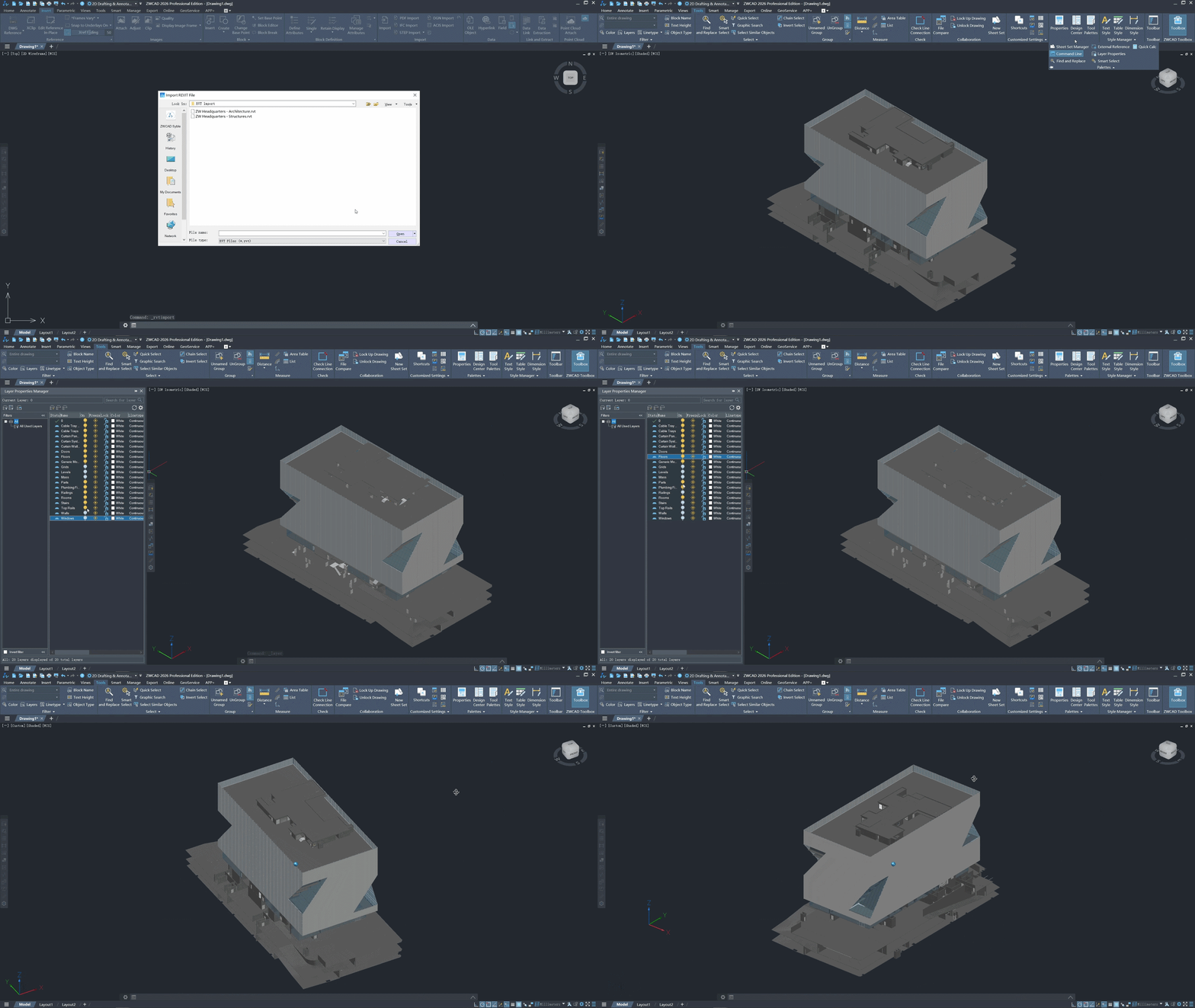
RVT Import makes it easier to bring Revit models directly into ZWCAD, creating a cleaner BIM-to-CAD workflow for professional users.
For architects, engineers and design teams working with Revit information while still producing DWG-based documentation, this provides a more connected way to work between BIM and CAD workflows.
Instead of treating Revit models and DWG documentation as completely separate workflows, ZWCAD 2026 3.2 provides a practical way to bring RVT data into your CAD environment and continue working with the information you need.
Ready to Experience ZWCAD 2026 3.2?
Whether you’re upgrading your existing CAD software or exploring ZWCAD for the first time, testing the latest release on your own projects is the best way to understand how it fits your workflow.
Download the ZWCAD 2026 3.2 30-Day Trial
Section Views: Inspect 3D Models More Easily
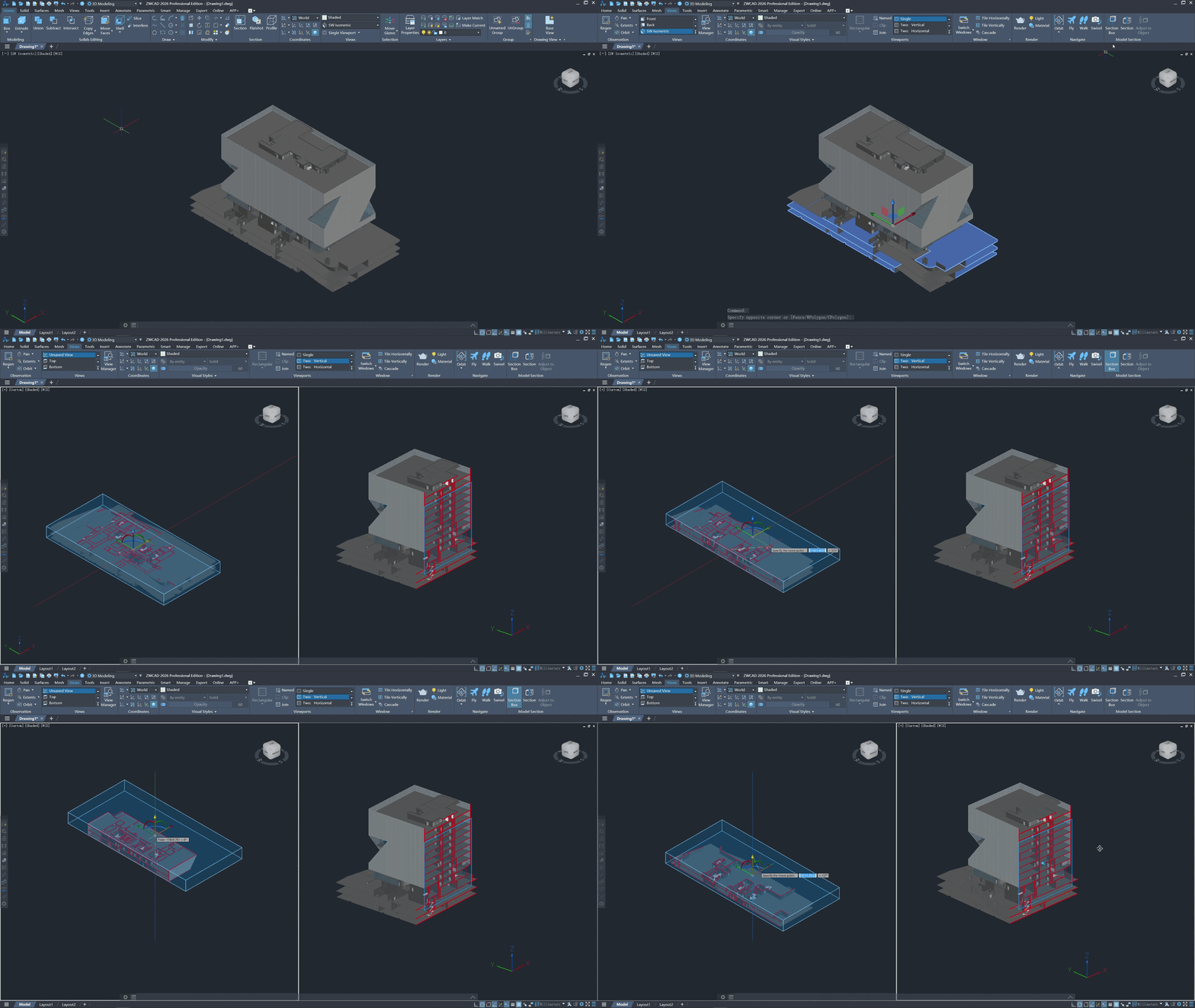
Section Views make it easier to inspect 3D models using dynamic section boxes and objects.
When working with complex 3D geometry, understanding what is happening inside a model can require constantly hiding or moving different parts of the design. Section Views provide a more practical way to examine the model without disrupting the overall workflow.
This can be particularly useful for architects, engineers and designers who need to inspect complex geometry and better understand how different elements of a 3D model relate to one another.
Enhanced Data Extraction: Extract Data from Multiple Drawings
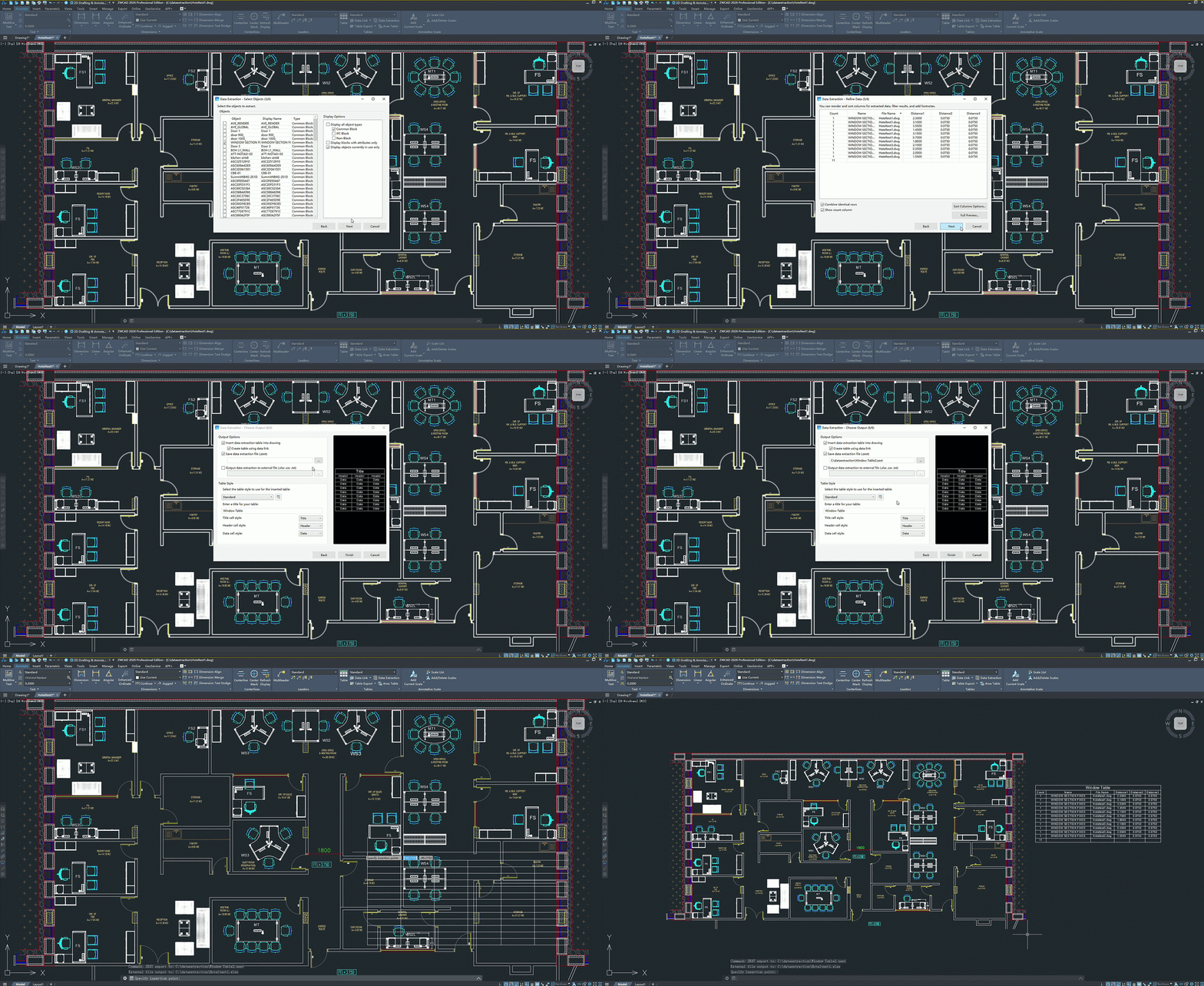
Enhanced Data Extraction makes it easier to gather information from multiple drawings or folders and bring it together into a single table.
For teams working across large numbers of DWG files, collecting information manually can become repetitive and time-consuming. Batch extraction helps reduce this manual work by allowing information to be gathered from multiple drawings in a more organised workflow.
This can be particularly useful for professional teams managing large drawing sets where consistent data collection is an important part of the project workflow.
Enhanced MEASUREGEOM: Quick and Practical Measurements
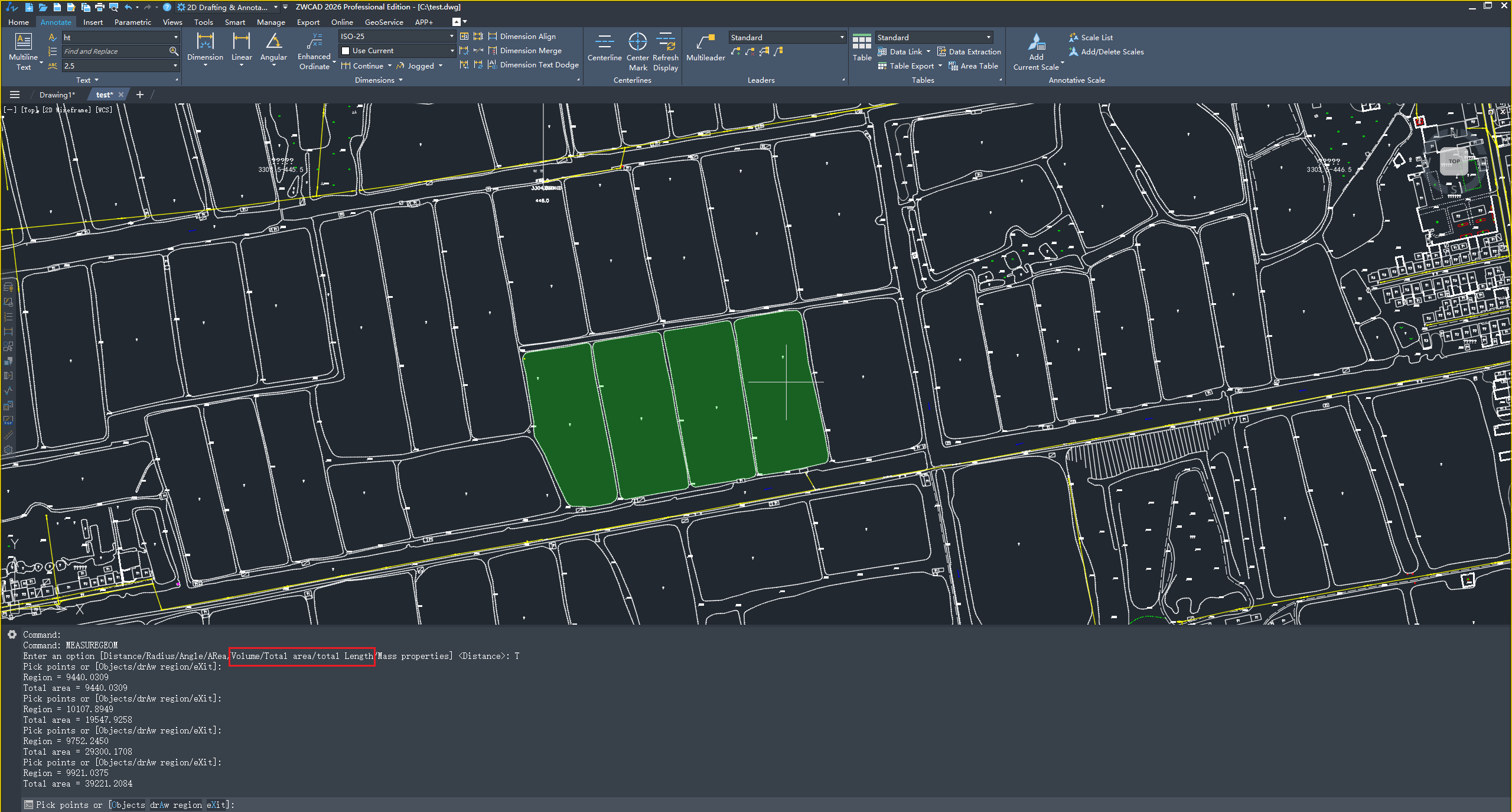
ZWCAD 2026 3.2 also enhances MEASUREGEOM, making it easier to quickly check important measurements directly within your CAD workflow.
For everyday design and documentation work, being able to verify measurements quickly can save time and reduce the need for manual calculations or additional steps.
Whether you are checking a 3D model or reviewing drawing information, the enhanced MEASUREGEOM tools provide quick access to key measurement data.
What Can You Measure?
- Volume
- Total Area
- Total Length
Why This Update Matters
ZWCAD 2026 3.2 continues to develop as a professional CAD platform, with improvements focused on areas that matter in everyday design and documentation workflows.
ZWCAD 2026 3.2 is about making an already fast CAD platform even more dependable.
The update concentrates on stability, custom CAD workflows and better font compatibility — especially useful for businesses running LISP/DCL routines, legacy drawing standards and large DWG libraries.
The question is not simply which CAD software costs less. It is whether the CAD system provides the capabilities your business needs without unnecessary overhead.
For businesses reviewing licensing, workflow costs or their long-term software strategy, ZWCAD 2026 3.2 is worth taking a closer look at.
Try ZWCAD 2026 3.2 for Yourself
The best way to evaluate any CAD system is to test it on your own work. ZWCAD 2026 3.2 is available to try, giving you the opportunity to see how it fits into your existing CAD workflow.
If you currently work with DWG files, take the time to test the areas that matter most to your team before making a software decision.
Put ZWCAD 2026 3.1 Through Your Workflow
- Open your existing DWGs
- Check your blocks and libraries
- Test your Xrefs
- Run your plotting workflow
- Explore the new ZWCAD 2026 3.1 features
Testing ZWCAD with your own projects can help you understand how the software fits your team’s existing workflows and requirements.
Frequently Asked Questions
ZWCAD 2026 3.2 introduces improvements including RVT Import, Section Views, Enhanced Data Extraction and enhanced MEASUREGEOM tools. These updates focus on BIM connectivity, 3D model inspection, data handling and everyday measurement workflows.
Yes. ZWCAD 2026 3.2 introduces RVT Import, allowing users to bring Revit models directly into ZWCAD for a cleaner BIM-to-CAD workflow.
The enhanced MEASUREGEOM tools allow users to quickly check volume, total area and total length, making everyday measurement tasks more straightforward.
Yes. SEEIT3D is promoting a 30-day free trial of ZWCAD 2026 3.2, giving users the opportunity to test the software with their own CAD workflows before making a decision.
Compare Before You Decide
If you currently use AutoCAD, don’t switch simply because of price. Compare the functionality properly and consider how well a CAD system fits your existing workflows.
Professional CAD decisions can affect existing DWG workflows, commands and productivity tools, blocks and libraries, Xrefs, plotting, team standards, migration effort and ongoing software costs.
The goal is not simply to choose cheaper CAD. It is to understand whether you can maintain the capability your business needs while reducing unnecessary overheads.
Ready to Buy ZWCAD?
If ZWCAD 2026 3.2 looks like the right fit for your business, See-it-3D can help with licensing, migration advice, training and workflow support.
Compare. Test. Then Decide.
The best way to review professional CAD software is to compare the functions that matter to your team, test the software with your own work and then decide which solution fits your requirements.
At SEEIT3D, we can help with licensing, migration, training and workflow advice so you can make the move with confidence.