
If you’re looking for the latest improvements in SketchUp Desktop 2026.2, you’ve come to the right place.
This release introduces a range of practical enhancements designed to improve the way architects, interior designers, landscape professionals and 3D artists work. Rather than focusing on minor interface changes, SketchUp Desktop 2026.2 delivers new tools that help you analyse designs more effectively, create accurate documentation and streamline everyday workflows.
From the new Analysis Hub and improved shadow studies to enhanced LayOut performance and better interoperability, this update is built to help professionals make smarter design decisions while saving valuable time.
In this guide, we’ll explore the most important features in SketchUp Desktop 2026.2, explain how they improve your workflow, and help you decide whether upgrading is the right choice for your projects.
Whether you are developing early design ideas, producing professional documentation, working with scans or improving the quality of your visual presentations, the right SketchUp setup can make a real difference to the way your business works.
For a limited time, SEEIT3D is offering special promotional pricing across selected SketchUp licences and upgrade routes.
What's New in SketchUp Desktop 2026.2?
SketchUp Desktop 2026.2 focuses on improving productivity, design analysis and documentation rather than simply adding new modelling tools. The latest release introduces several meaningful enhancements that make it easier to evaluate your designs, manage extensions and create more accurate project documentation.
Some of the key improvements include:
- New Analysis Hub
- Advanced Shadows
- Daylight Analysis tools through SketchUp Labs
- LayOut graphics improvements
- Faster shadow performance
- Improved extension migration
- Better interoperability with Revit
- General performance and stability enhancements
Whether you’re designing a residential extension, a commercial development or a landscape project, these improvements are aimed at helping you work more efficiently throughout every stage of your project.
Analysis Hub: A Smarter Way to Evaluate Your Designs
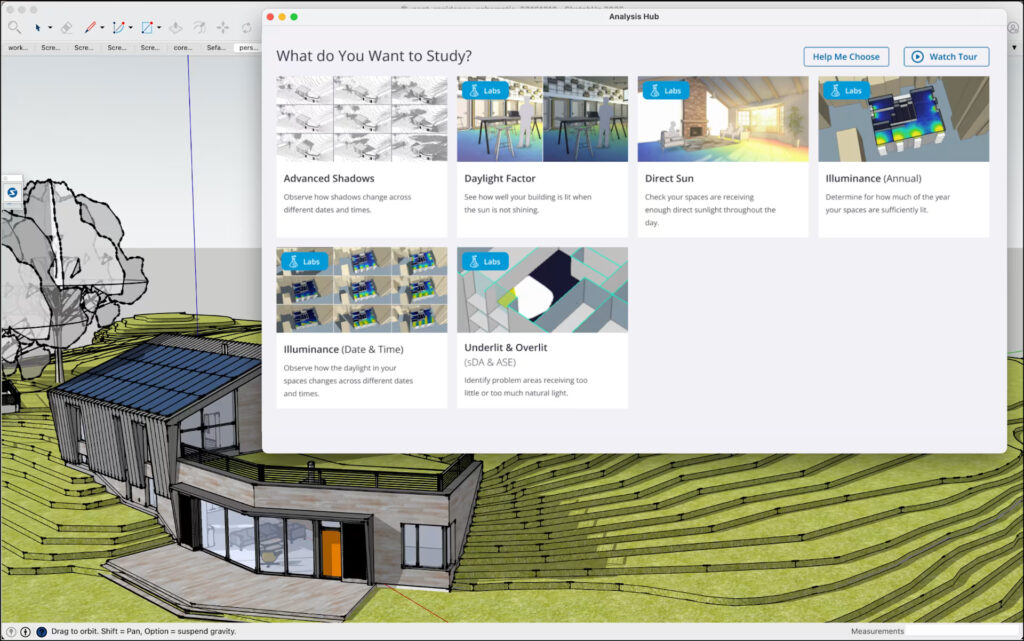
One of the biggest additions in SketchUp Desktop 2026.2 is the introduction of the Analysis Hub. This new workspace brings environmental analysis directly into SketchUp, allowing designers to evaluate how their projects perform without relying on multiple third-party applications.
Instead of switching between different software packages, the Analysis Hub provides quick access to analysis tools within your familiar SketchUp workspace. This creates a smoother workflow and enables better-informed design decisions from the earliest stages of a project.
For architects and designers, understanding how a building responds to natural light is becoming increasingly important. With the Analysis Hub, environmental considerations become part of the design process rather than an afterthought.
Why it matters
The Analysis Hub can help professionals:
- Evaluate daylight conditions more efficiently
- Improve sustainable design decisions
- Identify potential issues earlier
- Save time by reducing software switching
- Present clearer design information to clients
This feature is especially valuable for professionals working on residential, commercial, educational and landscape projects where daylight and environmental performance play an important role.
Ready to Experience the New Features of SketchUp Desktop 2026.2?
Whether you’re upgrading your existing licence or exploring SketchUp for the first time, choosing the right version can make a significant difference to your workflow. At See-it-3D, we provide genuine SketchUp licences, expert advice and professional training to help you get the most from the latest release.
Download SketchUp 2026.2 7-Day Trial
Advanced Shadows: More Accurate Sunlight Studies
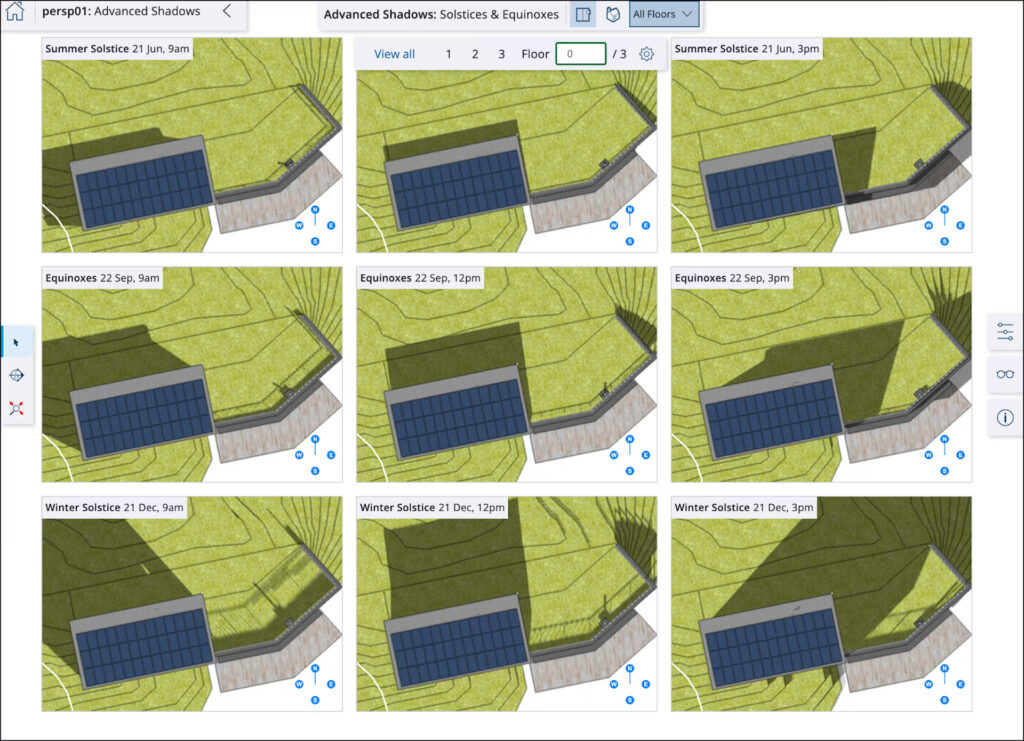
Another standout feature in SketchUp Desktop 2026.2 is Advanced Shadows.
Traditional shadow studies required users to manually adjust the date and time to understand how sunlight affected a design. While useful, this process could be repetitive and time-consuming, particularly for larger projects.
Advanced Shadows simplifies this workflow by making it easier to evaluate sunlight throughout different times of the year. Architects can quickly visualise seasonal shadow behaviour and better understand how surrounding buildings, trees and landscape features influence natural light.
This leads to more informed decisions when planning building orientation, outdoor spaces and window placement.
Key benefits include:
- Faster shadow studies
- Improved understanding of seasonal sunlight
- Better support for sustainable building design
- More effective client presentations
- Reduced manual adjustments
For professionals working on planning applications or client approvals, these visual studies can communicate complex information in a much more accessible way.
Explore New Daylight Analysis Tools with SketchUp Labs
The Analysis Hub also provides access to a growing collection of experimental tools through SketchUp Labs. These tools allow professionals to explore advanced daylight analysis directly within SketchUp while Trimble continues to refine their development.
Some of the available analysis tools include:
- Annual Illuminance
- Daylight Factor
- Spatial Daylight Autonomy (sDA)
- Annual Sunlight Exposure (ASE)
- Direct Sun Analysis
These tools help designers understand how natural light performs throughout the year, making it easier to create healthier, more energy-efficient spaces.
Although these features are currently available through SketchUp Labs, they provide an exciting glimpse into the future direction of SketchUp, where environmental analysis becomes a natural part of the design workflow rather than a separate process.
LayOut Gets Even Better in SketchUp Desktop 2026.2
Creating professional documentation is just as important as building an accurate 3D model. That’s why SketchUp Desktop 2026.2 introduces meaningful improvements to LayOut, making it faster, more stable and easier to work with.
One of the biggest improvements is that the new LayOut graphics engine is now enabled by default. After extensive testing, it now delivers smoother performance, improved visual accuracy and a more reliable documentation experience. Whether you’re preparing planning applications, construction drawings or client presentations, these enhancements help you work with greater confidence.
Another welcome addition is Group Clipping Masks. You can now apply clipping masks directly to Groups and Scaled Groups, giving you more flexibility when creating clean presentation layouts without breaking your drawing apart.
Key Benefits
- Faster and smoother document navigation
- Improved graphics stability
- Better visual consistency
- Group Clipping Masks for greater flexibility
- More efficient documentation workflow
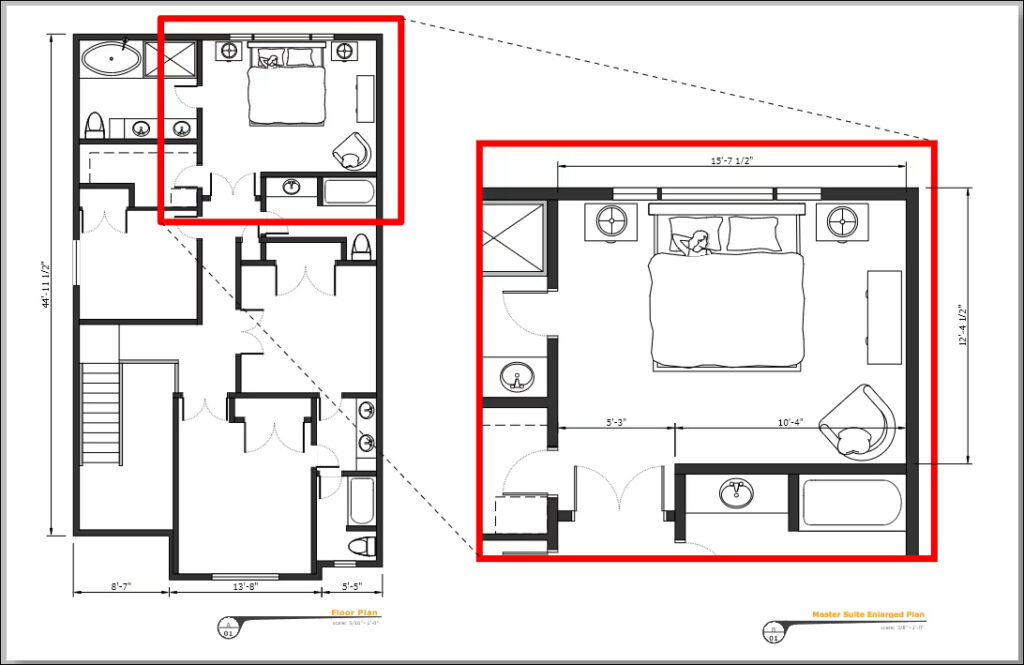
Create Better Project Documentation
Professional drawings deserve professional tools. If you’re planning to upgrade to SketchUp Desktop 2026.2, See-it-3D can help you choose the right licence and get started quickly.
Faster Shadows, Smoother Modelling
Working with shadows has always been essential when presenting architectural concepts, but complex models could sometimes slow navigation.
With SketchUp Desktop 2026.2, the standard shadow system has been optimised to deliver significantly better performance. Models remain more responsive even when shadows are enabled, making it easier to explore your design without constantly switching visual settings on and off.
For architects, landscape designers and urban planners, this means a smoother modelling experience while still being able to evaluate how sunlight interacts with a project.
Why This Matters
- Faster model navigation
- Improved viewport performance
- Better presentation experience
- Less waiting on complex projects
Smarter Workflow Improvements That Save Time
Not every update has to be a major new feature to make a difference. SketchUp Desktop 2026.2 also includes several workflow improvements designed to save time during everyday work.
The Extension Migration process is now more seamless, allowing supported extensions and workspace preferences to move across without requiring a restart. Windows users will also notice that the Components panel now searches in-model components by default, making it quicker to locate assets already used in a project.
These improvements may seem small individually, but together they help create a smoother and more productive modelling experience.
Workflow Improvements Include
- Easier Extension Migration
- Faster component searching
- Less setup time after upgrading
- Improved day-to-day productivity
Improved Revit Import and Scan Essentials
For professionals working within BIM workflows, SketchUp Desktop 2026.2 also introduces improvements to interoperability.
The latest Revit Importer offers better handling of railings, curtain walls and curved columns, helping preserve more project information when importing Revit models into SketchUp. Users of Scan Essentials can now save point cloud visibility settings for individual scenes, making it easier to manage complex scan data across presentations and documentation.
These updates help reduce manual adjustments while improving collaboration between design teams using different software platforms.
Should You Upgrade to SketchUp Desktop 2026.2?
If you’re using SketchUp regularly for architecture, interior design, landscape architecture or construction documentation, SketchUp Desktop 2026.2 is a worthwhile upgrade.
The new Analysis Hub alone brings valuable environmental analysis directly into SketchUp, while improvements to LayOut, shadow performance and workflow management make everyday tasks faster and more enjoyable.
We recommend upgrading if you:
- Want access to Analysis Hub and Advanced Shadows
- Create technical drawings in LayOut
- Work with Revit or BIM workflows
- Use SketchUp professionally every day
- Want the latest performance improvements
If your workflow depends on productivity and collaboration, this update delivers meaningful benefits rather than just cosmetic changes.
Frequently Asked Questions
If you have an active SketchUp subscription, you can usually update to the latest version at no additional cost. Check your Trimble account or SketchUp for update availability.
The headline feature is the new Analysis Hub, which introduces Advanced Shadows and provides access to additional daylight analysis tools through SketchUp Labs.
Yes. The graphics engine is now enabled by default, offering improved stability, better rendering accuracy and new Group Clipping Masks.
For professional users, yes. The combination of Analysis Hub, LayOut enhancements, workflow improvements and better interoperability makes this one of the most practical updates in the 2026 release cycle.
Final Thoughts
SketchUp Desktop 2026.2 is more than a maintenance update. It introduces practical tools that help professionals analyse designs more effectively, produce higher-quality documentation and work more efficiently every day.
From the powerful new Analysis Hub and Advanced Shadows to improved LayOut performance, workflow enhancements and stronger BIM interoperability, this release focuses on solving real-world design challenges.
Whether you’re an architect, interior designer, landscape professional or 3D visualiser, SketchUp Desktop 2026.2 provides meaningful improvements that can enhance both productivity and project quality.
Ready to Upgrade?
Get the latest SketchUp Desktop 2026.2 with expert advice, genuine licences and professional support from See-it-3D.